User Platforms


Transactions & Finance




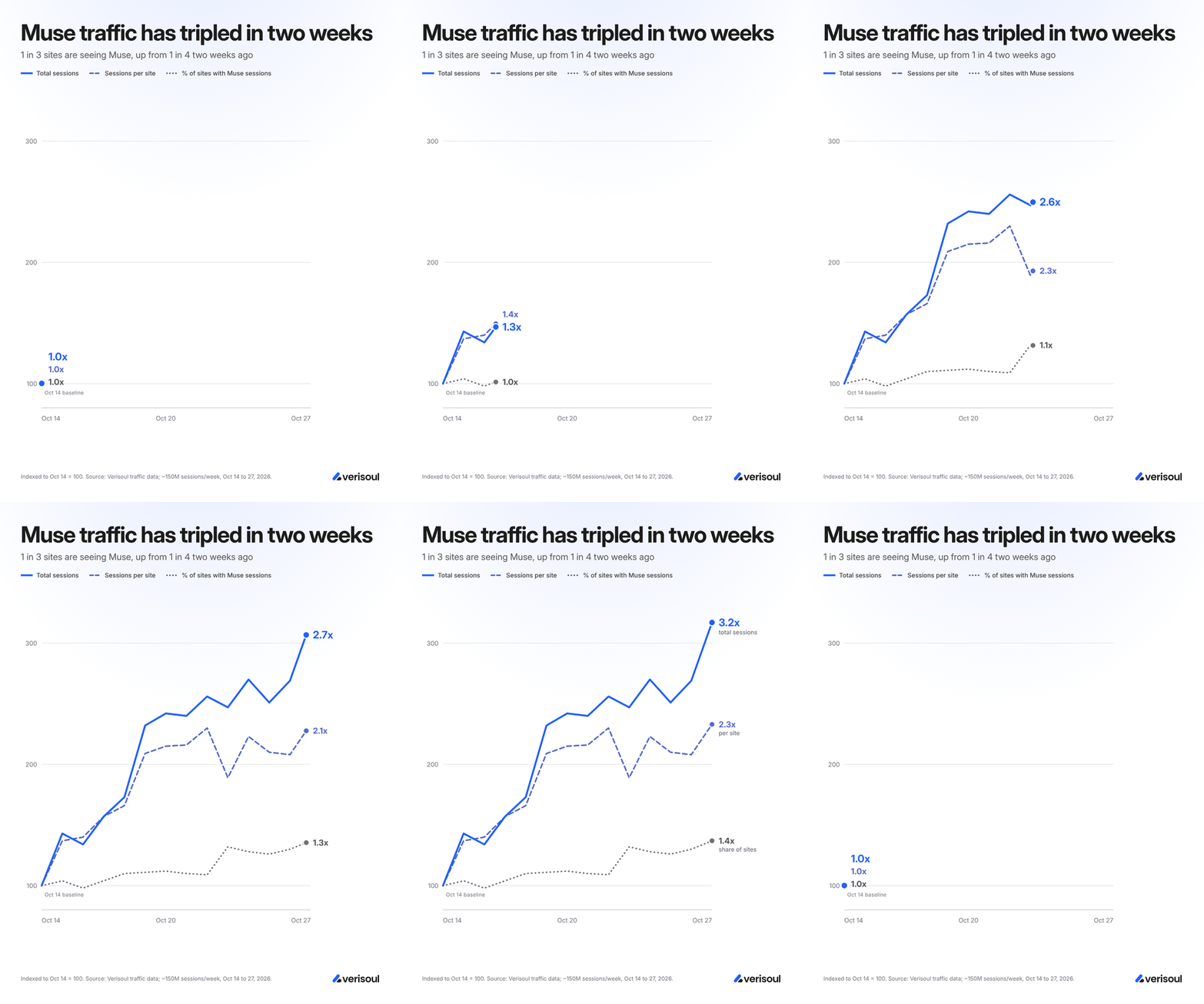
Personal AI agents have arrived, and they are catching on fast. The newest craze is Meta’s Muse, a well-marketed and adorable agent that might be the closest thing to a personal assistant that the general public will ever get. The appeal is easy to understand: give Muse a task and let it handle the rest, posing as you the entire time. In the past two weeks, we’ve seen sessions from Muse triple across Verisoul customers’ traffic.
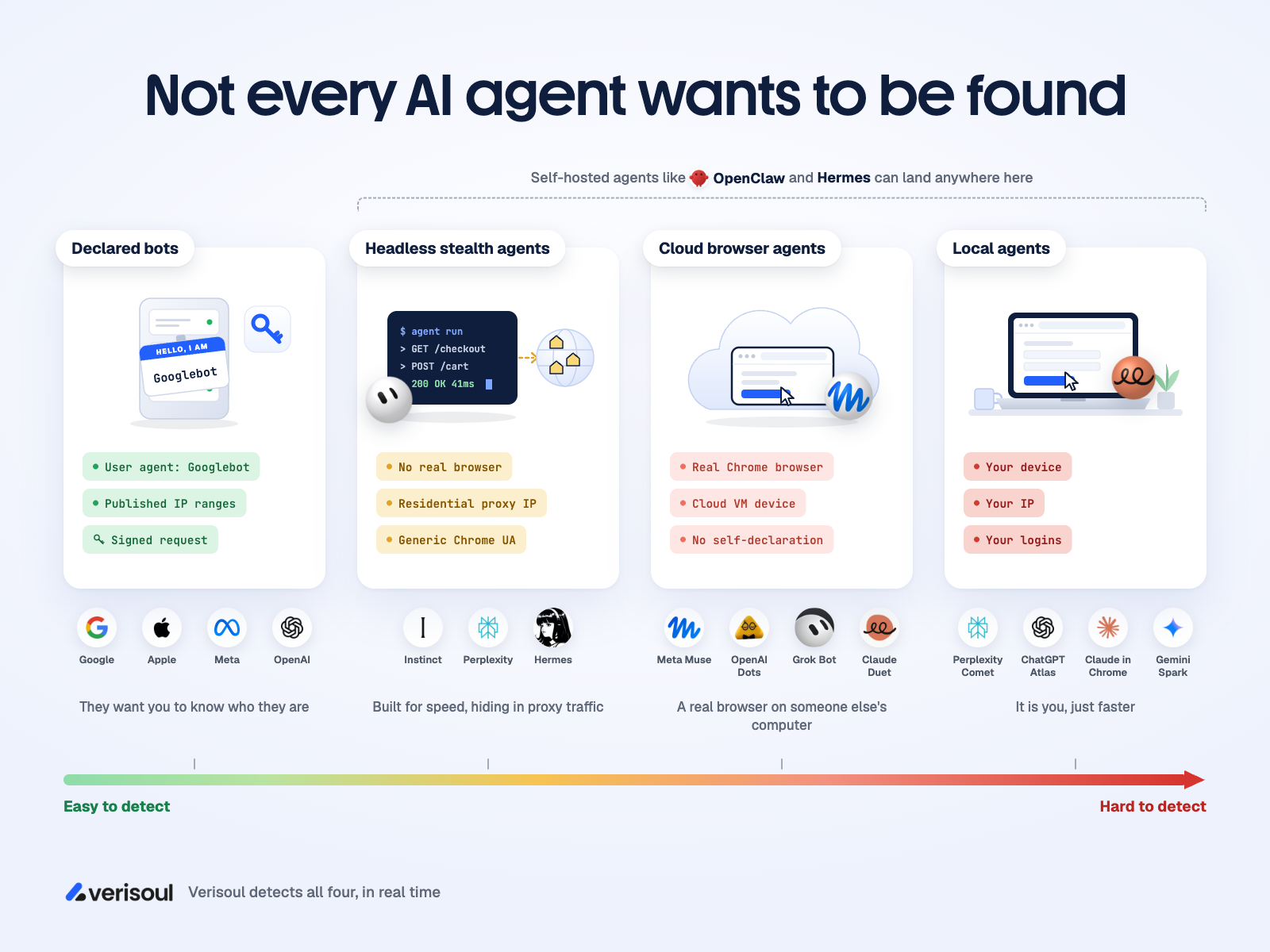
Muse isn’t alone, either. Instinct, Dots, Claude Duet and Grok Bot all browse, shop and sign in on someone’s behalf, and our Agent Atlas tracks each of them along with every other agent and bot we can identify.
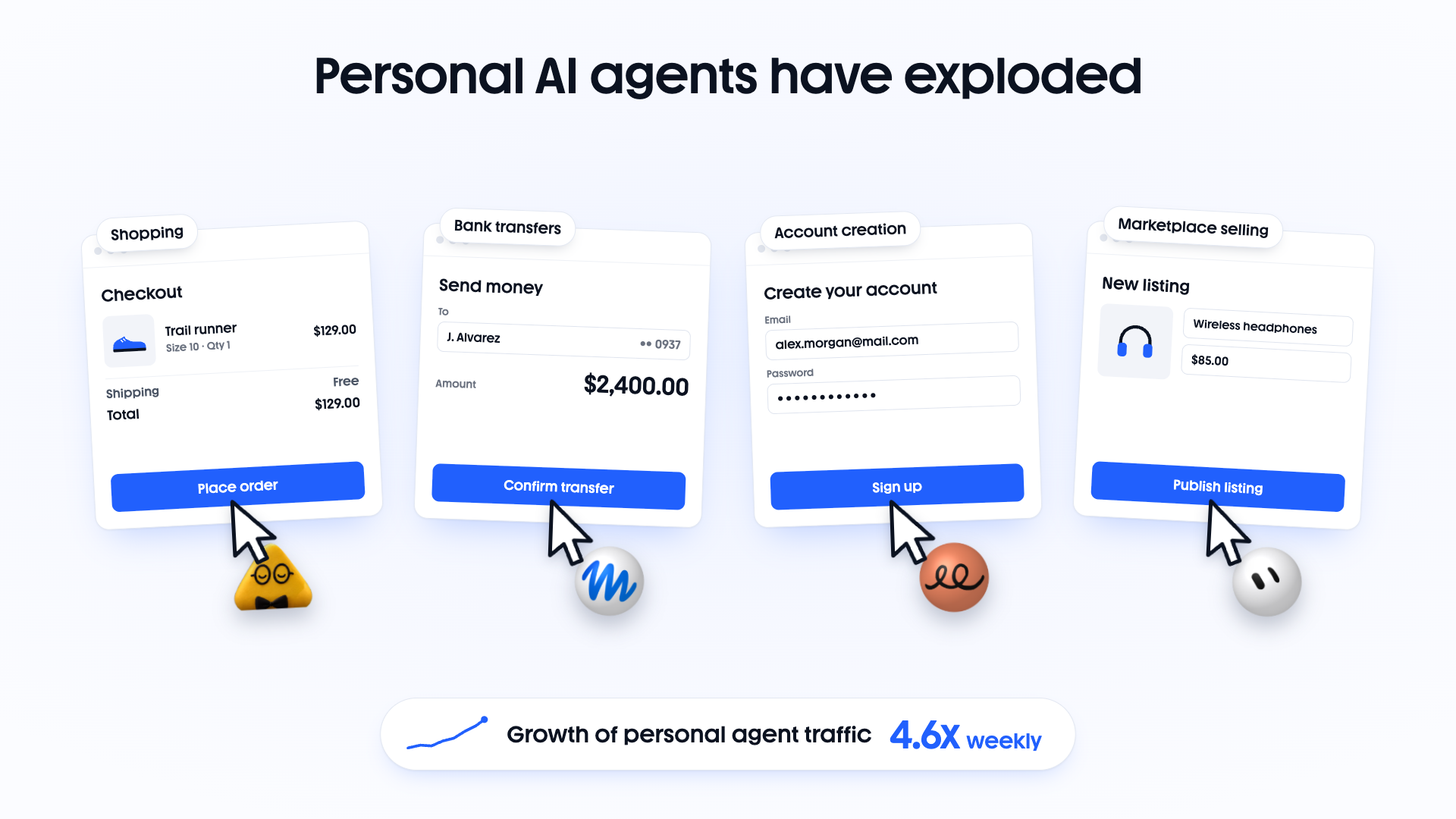
Unfortunately, this cute and fluffy agent has created an ugly problem for many industries. Muse runs from a real browser on a cloud machine. Unlike the research agents and crawlers that announce themselves in a respectful manner, Muse arrives looking just like a regular person on Chrome. Same headers, same TLS handshake, same everything.
For users, that means less time spent on everyday errands. For fraud and security teams, it creates a blind spot. The site sees a session, a cart, and a purchase, with no way to tell whether a person or a script was behind it. So now a new question comes to mind. How do you tell a Muse session from a regular customer? And once you can, what should you actually do about it?

Agents that run through a provider’s cloud gateway usually announce themselves. Agents that run headlessly like Instinct, inside a browser like Muse, or on your device like Claude Computer Use - attempt to blend in.
Some agents announce themselves and some do not, and the difference comes down to where their web requests originate.
Cloud crawlers and research agents. When a cloud-based agent such as Gemini Deep Research fetches a page, the request originates from the provider’s own infrastructure. Those systems send self-declaring headers, may declare their identity with their user-agent, and a growing number sign their requests under Web Bot Auth (WBA), so the site can verify who is knocking.
Personal agents in a browser. Muse, Dots, Grok Bot, browser extensions and desktop agents drive a real browser instance. There is no gateway in the path to stamp the request, so what arrives on your page is exactly what anyone else’s Chrome would send.
So to anything that relies on the user agent, a person browsing on Chrome and a Muse session browsing on their behalf look like the same visitor. The difference only shows up once you look at how the session behaves.
Should you block all AI agents? The idea is tempting, until you remember there is a real customer behind every Muse session, with real purchase intent, who really asked it to do a transaction.
If “wait and see” was your strategy for figuring out what to do about Muse, it’s probably time to reconsider! Here’s how Muse traffic accelerated from Oct 17 to Oct 26, 2026:
Note: We’re referring to sites/platforms rather than the number of our customers impacted because some organizations use multiple Verisoul projects to manage different apps, sites, brands, etc.
There’s nuance here, and even the biggest ecommerce companies disagree on whether to allow the Muse shopping agent. The stakes are high: according to Meta, the average purchase price on a Muse-driven session is $200. The easiest way to predict which side a company lands on is to look at where it makes its money between “I need new running shoes” and “order placed.”
If you sell the product, agents are another checkout lane. A merchant with its own inventory gets paid when the order goes through, whoever or whatever clicked the button. An agent that turns a sentence in a chat window into a completed order raises transaction velocity, so these merchants want the path to be as easy as possible for agents, with fraud controls on the risky steps. Shopify is the clearest example: Shop Pay plugs into agent checkout flows, and merchants on the platform pick up sales that started as a sentence typed into an assistant. Even Shopify keeps a person in the loop at the end, since its default storefront rules ask agents to hand the final checkout review back to the buyer.
If your margins depend on late-funnel ads, agents move the sale away from your ad auction. Amazon and Google earn a large share of their profit from ads at the very bottom of the funnel: the sponsored listing at the top of a search for running shoes, or a competitor’s ad shown when you search for a brand by name. Those ads rarely create new purchases, since the shopper has already decided to buy, and their job is to decide which seller gets the sale. An agent that reads the catalog and picks a product skips the sponsored slot entirely, so total commerce stays about the same while the ad revenue disappears. That is a big part of why Amazon blocks Muse.
The Amazon math shows why blocking is the fiscally responsible move for them (Amazon FY2025 annual report):
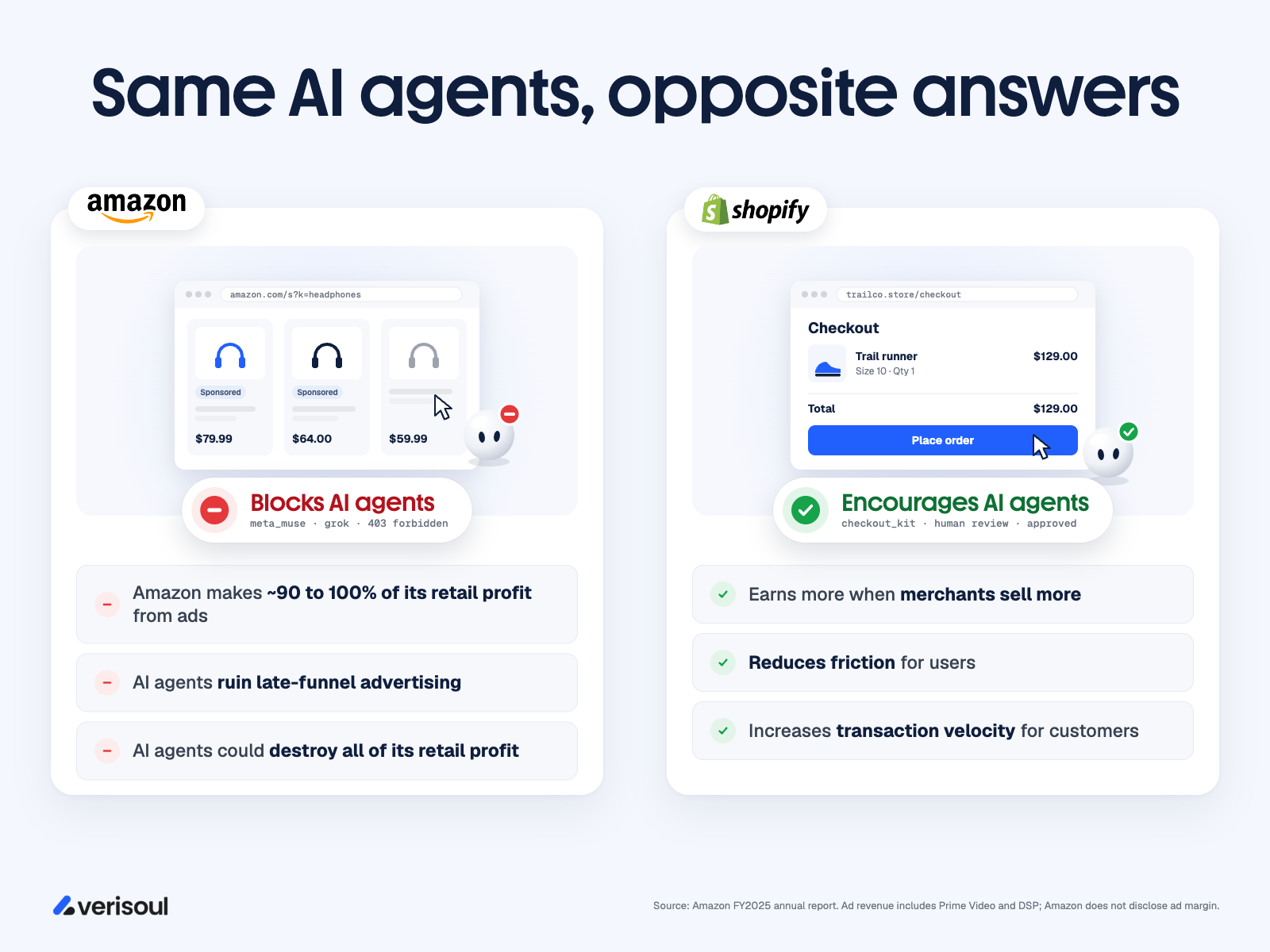
Every agent that shops on Amazon without seeing a sponsored listing chips away at the line that keeps retail profitable. Amazon’s public reasons for blocking are that agents should identify themselves and stay away from customer credentials, which are real concerns with technical fixes like signed agents and delegated logins, while the ad problem is one that no protocol solves. Amazon’s own behavior points the same way, since it has started selling sponsored placements inside Rufus, its in-house shopping assistant: ads keep working inside agents you own and stop working inside agents you don’t.
Both approaches are understandable. But both are also blanket policies, and that is where the trouble starts.
Realistically, most ecommerce merchants will want something in between, and that requires knowing which sessions are agents in the first place.

Fraud teams should assume bad actors will route attacks through agents, because agents make both third-party and first-party fraud easier to get away with.
Third-party fraud: the blame gets spread out. If you got hold of a stolen credit card today, your first move would be to hand it to an AI agent and let the agent check out. The purchase comes from the agent provider’s cloud machine, which thousands of legitimate users share, so your own device and network stay out of the picture. When the chargeback lands, the blame is split across the cardholder, the agent provider, the merchant and the payment platform, and the person who started it is the hardest one to find.
First-party fraud: “my AI did it.” Real customers now have a believable excuse for disputing a purchase they regret: they didn’t buy it, their agent did. Dispute rules were written for purchases a person either made or didn’t make, and they haven’t settled who is responsible when a person’s own agent placed the order. Knowing which sessions were agent-driven, and keeping a record of exactly what the person approved, is what lets you win those disputes.
Everything above applies to banks and fintechs with higher stakes, since the transactions are money movement. A card purchase can be charged back, while a P2P transfer, a wire or a crypto withdrawal is usually gone once it clears.
For most banks the answer looks like ecommerce: let agents handle low-risk tasks like checking balances, pulling statements and paying known billers, and have the person step in for anything that sends money somewhere new. More on how to do that below.

There are four ways to spot an agent, and they fall into two groups: the agent tells you who it is, or you work it out yourself.
1. Cryptographic signatures (Web Bot Auth). The agent signs each request with a private key, and the site checks the signature against the operator’s published keys.
2. User agent declaration. The agent puts its name in the user agent string, like Googlebot or ClaudeBot. This is what Amazon’s terms ask agents to do.
Self-declaration is the strongest proof when an agent offers it, though most of the agents fraud teams worry about skip it. Device, network and behavior cover the rest, and behavior is the hardest to fake.
3. Device and network signals. Look at where the traffic comes from (known agent IP ranges, cloud hosting providers, datacenters) and what it runs on (headless browsers, automation frameworks, device details that don’t add up).
4. Behavior. Watch how the session moves: mouse paths, click timing, typing rhythm, scrolling and how fast it navigates between pages.

Verisoul uses all four together. Signed agents get the strongest label, self-declared agents get confirmed against network and behavior, and agents like Muse that stay quiet get inferred from the combination of device, network and behavioral signals. Every session gets a bot score from 0 to 1 in real time, and the API tells you which method identified the agent so you can decide how much to trust it. Each agent’s page in the Agent Atlas shows how it identifies itself (or doesn’t) and which signals we use to catch it.
With enough time and resources, maybe you can. But a lot of industries need a solution ASAP.
When a security team builds its own agent rules, the first draft is almost always static. IP clusters. Proxy flags. A network risk threshold. This is great until you end up blocking real customers from using your platform.
That is because plenty of traffic can look suspicious on paper. Corporate networks, shared datacenter VPNs, cloud proxies, privacy browsers, etc. The missing piece is behavior. A person on a corporate VPN still moves through a webpage like a person.
Verisoul’s behavioral detection model was tuned on the sessions we see across our wide customer base. It’s been thoroughly tested to ensure we catch AI agents while avoiding false positives.

Verisoul’s API gives you two pieces of information about agents on every session: a bot score that says how likely the session is automated, and an agent object that says which agent it is whenever we can name it. The same fields show up in our dashboard as well. Here is a trimmed API response for a session that Muse was driving:
{
  "bot": 0.9891,                // how likely the session is automated
  "session": {
    "bot": {
      "mouse_num_events": 1079,
      "click_num_events": 146,
      "keyboard_num_events": 0
    },
    "agent": {                  // which agent it is
      "id": "meta_muse",
      "name": "Meta Muse",
      "provider": "Meta",
      "type": "ai_assistant",
      "detection_method": "inferred",
      "detection_signals": ["network", "device", "behavioral"]
    }
  }
}
1. The bot score (bot, from 0 to 1) tells you how likely it is that the session is automated, whoever is behind it. It combines environment checks (headless browsers, automation frameworks, tampered runtimes), behavior (the interaction counts above are a small slice of what the model reads) and network patterns. Bot score docs
2. The agent (session.agent) tells you who is driving. The fields to build rules on are:
id: a fixed label like meta_muse (Meta Muse) or chatgpt_agent (Dots), which stays the same even if an agent rebrands and its display name changestype: ai_agent, ai_assistant, ai_crawler, crawler, headless_automation or otherdetection_method: signed, self_declared or inferred, which maps to the detection methods above and tells you how much proof sits behind the labeldetection_signals: which of cryptographic, network, device and behavioral signals the identification rests onSometimes we need to watch a session for a few moments before we can name the agent, so a session can show no agent at first and an agent later on, and once we identify one it stays on that session. See the agent detection docs, and browse the Agent Atlas for the full list of agent IDs you can write rules against.
Read together, the two fields sort sessions into clear groups:
Always know when an AI agent is operating - even if you allow them for certain actions. Let agents do the low-risk work, and have the person step in when money moves or the account changes.
Most of what an agent does on your site is harmless: searching, comparing, filling a cart, checking a balance. The risk sits in a handful of actions, so the safest way to welcome agents is to save the friction for those moments.
| Situation | Suggested action |
|---|---|
| A signed agent you trust, such as a partner’s shopping assistant | Allow, including checkout |
| Crawlers and AI search agents reading your catalog | Allow, with rate limits |
| An inferred personal agent like Muse browsing or filling a cart | Allow |
| An inferred agent checking out or sending a payment | Allow on established accounts with saved payment methods; step up for large amounts, new cards or new payees |
| Any agent changing a password, email, phone number or payout details | Always step up |
| Any agent adding a payee or raising a transfer limit | Always step up |
| Headless automation at account creation | Block |
| High bot score with no agent named | Challenge, and block on signup, login and payment pages |
Run new rules in monitor mode for a week or two first, so you can see how much agent traffic each one would touch before anything gets blocked.
A step-up only works if it reaches the person and the agent can’t complete it for them:
Whichever step-up you use, show the specifics of what the person is approving. “Approve a $200 order from Acme Outdoors” gives you a record to point to when a dispute comes in, while “allow your assistant to shop” gives you very little.
Our goal is to give you the answers you need. You decide how far to open the door, for whom, and for which actions. (And yes, you can still slam it shut.)
The agentic internet is scaling faster than most industries ever expected. Browse the Agent Atlas to see every agent we track, from Meta Muse to Grok Bot. If you would like to know how much of your traffic is driven by agents like Muse and you need help getting started, let’s talk.